---
title: Activating Sensos Label
description: There are two ways to activate your Sensos Label
---
[Skip to content](https://learn.sensos.io/activating-sensos-label#main-content)
- [English](https://learn.sensos.io/activating-sensos-label)
- [Deutsch](https://learn.sensos.io/de/sensos-label-aktivieren)
- [Español](https://learn.sensos.io/es/activación-de-la-etiqueta-sensos)
English
Show submenu for translations
[](https://learn.sensos.io/?hsLang=en)
- [Knowledge Hub Home](https://learn.sensos.io/)
- [Sensos Website](http://sensos.io/)
- [Log in to Sensos Sync](http://sync.sensos.io/)
- [Customer Portal](https://customerportal.sensos.io/tickets-view/new)
Open main navigation
Close main navigation
- [Knowledge Hub Home](https://learn.sensos.io/)
- [Sensos Website](http://sensos.io/)
- [Log in to Sensos Sync](http://sync.sensos.io/)
- [Customer Portal](https://customerportal.sensos.io/tickets-view/new)
- - [English](https://learn.sensos.io/activating-sensos-label)
- [Deutsch](https://learn.sensos.io/de/sensos-label-aktivieren)
- [Español](https://learn.sensos.io/es/activación-de-la-etiqueta-sensos)
English
Show submenu for translations
- [Contact us](http://sensos.io/contact-us/)
[Contact us](http://sensos.io/contact-us/?hsLang=en)
Welcome to The Sensos Knowledge Hub
- There are no suggestions because the search field is empty.
1. [The Sensos Knowledge Hub](https://learn.sensos.io/?hsLang=en)
2. [The Sensos Label](https://learn.sensos.io/the-sensos-label?hsLang=en)
3. [Getting Started with Sensos Label](https://learn.sensos.io/the-sensos-label?hsLang=en#getting-started-with-sensos-label)
# Activating Sensos Label
There are two ways to activate your Sensos Label:
#### 1. Using the Adhesive Backing
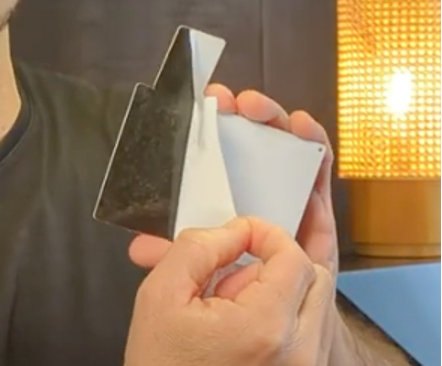
This is the most common method, as it allows you to attach the label directly to a parcel. Simply peel off the protective sheet covering the adhesive surface on the back of the label.
#### 2. Using the Magnet (Optional)
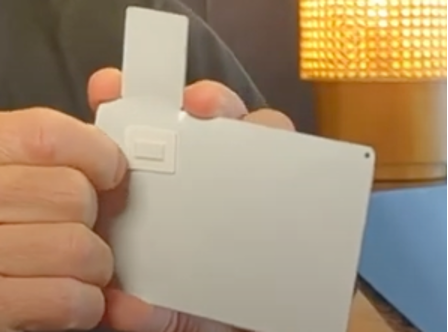
If you don't want to use the adhesive backing, you can activate the label using the magnet on its back. Simply peel off the magnet to activate it.
### Self-Test and Results
Once activated, the Sensos Label will automatically run a self-test to ensure proper functionality. It's important to pay attention to the results of this test.
The Label will pulse blink blue as it powers up until it finishes the internal test – then it should be solid blue and turn off.
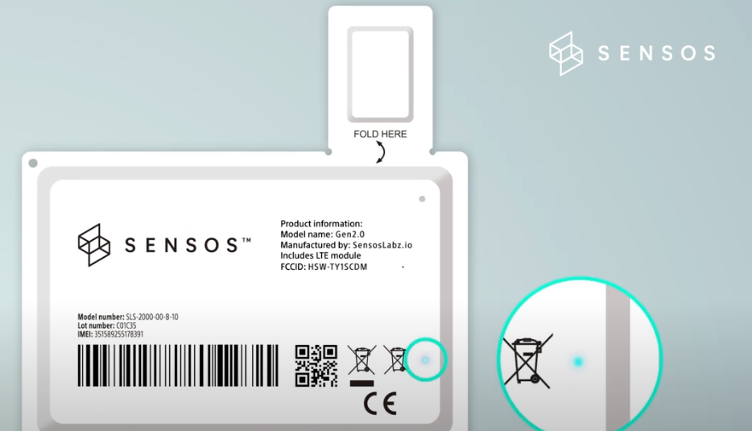
**Important Note**: The open/close flap on the Label is an integral part of the tamper detection system. Cutting or damaging the flap will disable the Label's ability to detect opening and closing events, and may cause the Label to stop functioning altogether. Please handle the Label with care during activation and throughout the shipment process to ensure proper functionality.
#### LEARN MORE
**Get in Touch. We’re Here to Help.**
Let’s discuss how Sensos can transform your logistics operations:
[Contact Us](http://sensos.io/contact-us/?utm_medium=website&utm_source=website&utm_campaign=knowledge-hub&utm_content=article-page&hsLang=en)
- [Getting started](https://learn.sensos.io/getting-started?hsLang=en)
- [LIA](https://learn.sensos.io/lia?hsLang=en)
- [Sync](https://learn.sensos.io/sync?hsLang=en#main-content)
- [Shipment Lifecycle Management](https://learn.sensos.io/sync?hsLang=en#shipment-lifecycle-management)
- [Data, Events & Reporting](https://learn.sensos.io/sync?hsLang=en#data-events-reporting)
- [The Sensos Label](https://learn.sensos.io/the-sensos-label?hsLang=en#main-content)
- [Getting Started with Sensos Label](https://learn.sensos.io/the-sensos-label?hsLang=en#getting-started-with-sensos-label)
- [Tracking & Environmental Monitoring](https://learn.sensos.io/the-sensos-label?hsLang=en#tracking-environmental-monitoring)
- [Security & Tamper Detection](https://learn.sensos.io/the-sensos-label?hsLang=en#security-tamper-detection)
- [Transit-Specific Settings & Compliance](https://learn.sensos.io/the-sensos-label?hsLang=en#transit-specific-settings-compliance)
- [FAQs](https://learn.sensos.io/faqs?hsLang=en)
- [Technical](https://learn.sensos.io/technical?hsLang=en)
- [Use Cases & Case Studies](https://learn.sensos.io/use-cases-case-studies?hsLang=en#main-content)
- [3PL](https://learn.sensos.io/use-cases-case-studies?hsLang=en#3pl)
- [Aviation](https://learn.sensos.io/use-cases-case-studies?hsLang=en#aviation)
- [Security](https://learn.sensos.io/use-cases-case-studies?hsLang=en#security)
- [Life Science](https://learn.sensos.io/use-cases-case-studies?hsLang=en#life-science)
- [Visibility](https://learn.sensos.io/use-cases-case-studies?hsLang=en#visibility)
- [Cold Chain](https://learn.sensos.io/use-cases-case-studies?hsLang=en#cold-chain)
- [Release notes](https://learn.sensos.io/release-notes?hsLang=en#main-content)
- [2026](https://learn.sensos.io/release-notes?hsLang=en#2026)
- [2025](https://learn.sensos.io/release-notes?hsLang=en#2025)
- [2024](https://learn.sensos.io/release-notes?hsLang=en#2024)
[](http://sensos.io?hsLang=en)
Gain complete supply chain transparency through real-time data and actionable insights.
Copyright © 2026, Sensos Inc.
**Sign up for the Sensos Newsletter:**