Sensos Asset Tracking provides continuous visibility into the location, condition, and movement history of high-value, long-lived assets, without introducing asset management complexity.
This feature is designed for organizations that need to:
- Know where an asset is right now
- Understand what condition it’s in
- Review how it has moved over time
Asset Tracking is intended for operational visibility to prevent loss, reduce service delays, and prove asset condition in transit.
Why Asset Tracking Exists
Before Asset Tracking, customers tracked reusable assets by:
- Creating placeholder or recurring shipments
- Reusing shipment records
- Forcing asset journeys into shipment workflows
This resulted in fragmented history, confusing timelines, and unreliable answers to a basic question: “Where is my asset right now?”
Asset Tracking introduces a dedicated asset object, purpose-built for tracking reusable equipment, containers, toolkits, and other long-lived assets - without disrupting existing shipment workflows.
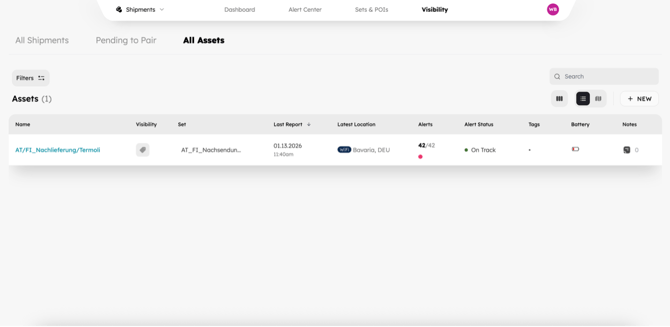
Where to Find Assets
Navigate to Visibility → All Assets.
The All Assets tab mirrors the All Shipments experience:
- Familiar table layout and filters
- Map view with current and home location filters
- Sorting and search
- Click-through to detailed views
This consistency ensures fast adoption with minimal training.
Asset Details Page
Each asset has a dedicated details page with the following sections:
Summary (Top of Page)
- Asset Identifier
- Associated Set
- Label battery status
- Last known location
- Time since last update
- Label identifier and online status
- Active label-based alerts
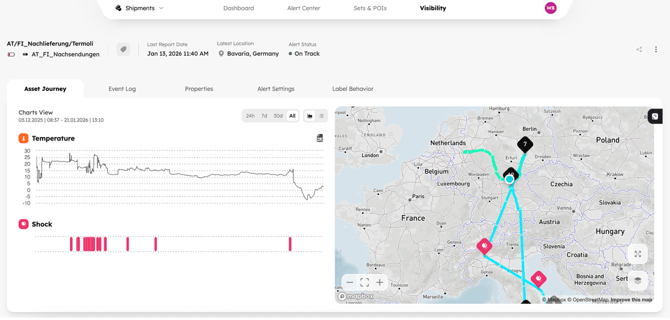
Asset Journey
Shows the complete label-based movement history:
- Map view with location pings
- Temperature Logging
- Humidity Logging
- Alert swimlanes
- No shipment milestones or shipment events
- Time based filter for most recent updates
Event Log
The asset’s audit trail:
- Alerts in chronological order
- Raw label reports (expandable)
- No shipment-related events
- Time based filter for most recent updates
Properties
Complete asset metadata:
- Identifier and type
- Associated Set
- Home Location
- Asset Type
- Inventory associations
- Device history
Alert Settings
- Label-based alerts remain configurable
- Shipment-only options are disabled and clearly marked
Label Settings
- Shipment-specific actions removed
- Core label configuration retained
Sets and Assets
Assets must be assigned to a Set to define:
- Reporting frequency
- Trigger thresholds (temperature, shock, movement)
- Alert behavior
Sensos uses one Set model for both shipments and assets.
Within Set configuration, shipment-only fields are visually marked and safely ignored when the Set is applied to an asset.
Creating an Asset
From All Assets, click Create Asset and complete the four-step wizard:
- Details - Identifier and optional type
- Properties - Home location and custom fields
- Items - Reference inventory items
- Visibility - Assign a Set and optionally pair a label
Assets can be created with or without a label and paired later.
Assets and Shipments
To ensure clarity, speed of delivery, and stability across existing shipment workflows, assets are not currently linked to shipments, and asset journeys reflect label history only.
LEARN MORE
Get in Touch. We’re Here to Help.
Let’s discuss how Sensos can transform your logistics operations:
Contact Us